
Tips on how to ensure you PDF is ready for printing
#printing #production #design
What is a print ready PDF and why do I need to make it?
A print ready PDF pretty much does what it says on the tin – it is a PDF document that has been prepared in a way that ensures the optimal print result.
Usually you will use another program to design your file, then export it to PDF to supply to your print provider – please note that individual providers may have their own specific requirements so always be sure to check first! Let’s take a look at the key points;
So how should my document look?
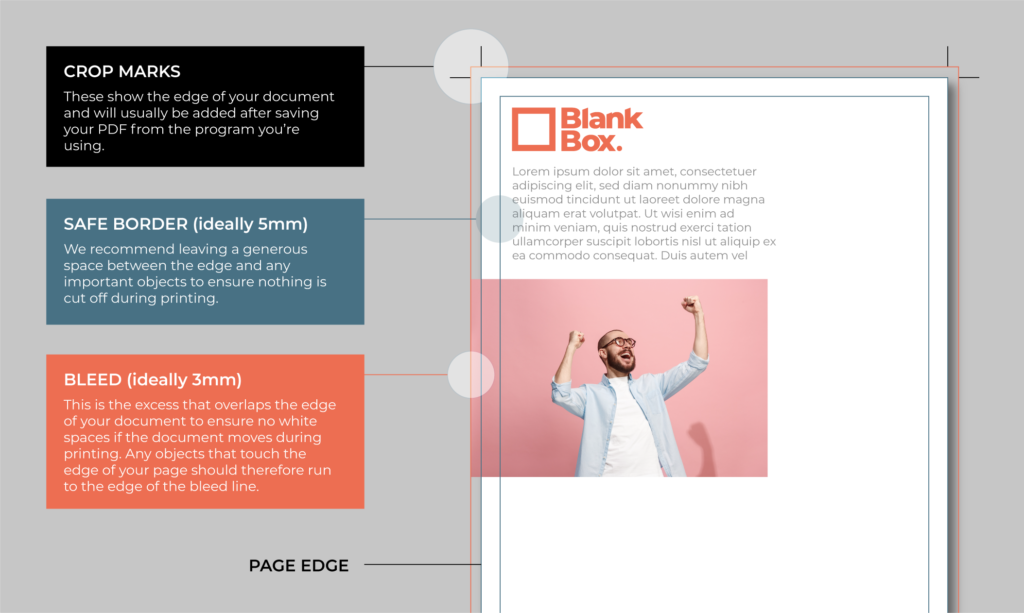
Below is a visual guide of how your print ready PDF will look, although it may not show all the elements until you have exported the PDF.
How do I make my PDF print ready?
Most design software will allow you to select all the requirements within the settings when saving your PDF. There may be some software that does not allow for all the necessary elements, in which case you may need to make it manually or speak to your designer.
Why does my file need to have bleed and crop marks?
During the print process, the design can move around a little on the page. The bleed gives a small margin for error that ensures a great result.
It is also for this reason we advise a ‘safe border’ so that that none of your important content gets close enough to the edge to get cut off.
Need help making your print file? We have decades of experience and are always happy to help! Drop us an email on hello@blankbox.business.